Quick game · Qwiz Rush
How to play Rhythm
Stay on the beat. Keep the combo alive.
- Free to host
- Players join by code
- No app to install
What is Rhythm?
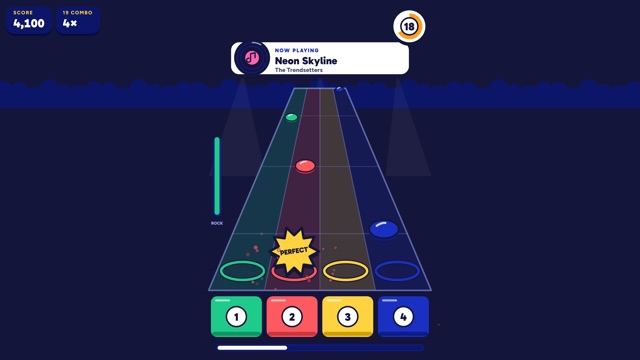
Rhythm is a music tapping game. Notes slide down towards a line, and you tap as each one arrives. Stay on the beat and your combo keeps climbing.
It is one of the mini-games built into Qwiz Rush (sometimes written Quiz Rush), the free live quiz you host from a browser while players join by code on their own devices.
- Type
- Quick game
- Players
- Best with a group
- Solo play
- No
How to play Rhythm
The host launches Rhythm and every device shows the note lanes.
Watch the notes travel towards the line.
Tap as each note reaches it.
Hit notes in a row to build your combo.
A missed note breaks the combo, so get back on the beat quickly.
Host settings
- Launch it from the Mini-games drawer on the host console, between questions or on the leaderboard.
- Players join on their own devices, and the projector shows the round while it runs.
Scoring
- Each well-timed tap scores for you.
- Longer combos are worth more than isolated hits.
Tips for Rhythm
- Tap with the beat, not at the note on screen.
- Keep your device volume up so you can feel the rhythm.
- If you miss, do not chase it. Rejoin the next note.
Frequently asked questions
How do you play Rhythm on Qwiz Rush?
Tap each note exactly as it reaches the line. Chain hits to build a combo and score more.
Can I play Rhythm solo?
Not really. This one is built for a group, so gather a few devices before you launch it.
Do I need a quiz set to play Rhythm?
No. It plays without a question set, so you can launch it from the host drawer at any time.
More game guides
Play Rhythm at your next quiz
Free to host. Launch Rhythm from the Games drawer between questions, and players join by code on their own devices.
- Free to host
- Players join by code
- No app to install